Grid Impact Model Session Example and Documentation


Grid Impact Model Sessions

GIM Models are designed for in-house applications. Model software is encapsulated in an Excel workbook providing easy-to-use option selections and output dashboards, charts and table presentations. Each Model progresses through three processes: An example GIM application is presented below.

Example Grid Impact Model (GIM) Analysis Results and Reports

The GIM model is embedded in an Excel workbook providing easy-to-use option selections, output presentations and the ability for users to conduct and document their own analysis.

This section provides screen shots of worksheets associated with an example EV analysis application using actual utility customer data for two Orlando ZIP codes.

The Grid Impact Model BEGIN tab selects forecast analysis options including EVs,
                                            demand management, electrification, price response and
                                            weather extremes

BEGIN TAB

The BEGIN tab selects one of two forecast options:
  • Distribution System - Small Area Load Analysis
  • Extract Individual Customer 8,760 hourly Loads From the GIM Database
Optional forecast options include impacts of the following items:
  • EVs
  • Demand side Mangement/DER/VPP
  • Weather extremes, and
  • Forecast year (current, 2030, 2035).
These options are described in more detail below.

The initial selected options in this example are Small Area Load Analysis with Electric Vehicles impacts with forecasts for the current year's customers.

Clicking on the "Execute Forecast/Analysis" button transfers control to the EV SETUP tab.

EV SETUP TAB

The Grid Impact Model EV SETUP tab include
                                       provides forecasting parameters for each session option. The EV SETUP tab specifies the percentage increase in EV ownership beyond the current service area 2% ownership.

The GIM model applies an AI machine-learning kNN model to estimate the probability that each household will own an EV model in the future. Ownership probability varies by income, educational attainment, commuting distance, householder age and other factors. The model determines which households in the utility service area are most likely to own an EV in order to meet the EV ownership input. Forecast EV ownership varies across service areas and neighborhoods reflecting variations in customer characteristics in these areas.

CUSTOMER FILTER FORM

The Grid Impact Model EV SETUP tab include
                                       provides forecasting parameters for each session option. GIM forecasts can be filtered to focus on customer segments based on income, educational attainment, dwelling unit floor space and construction year.

Customers can be further filtered to include only EV owners and or all-electric dwelling units.

Filtering is usefull for evaluating hourly load impacts for detailed customer segments corresponding to neighborhoods within ZIP code areas. At his point in the forecasting session there is no filtering.

HOURLY LOAD GRID IMPACT RESULTS TAB

Clicking on the "Execute Forecast/Analysis" button presents a form that recaps forecast parameters and, if accepted, continues on to execute the Grid Impact Model. In this example, the model will provide forecasts of hourly loads for a baseline and for EV ownership in these two ZIP codes that increases by 15% above the current (2% in this example).

Forecast and analysis results presented in the GIM Workbook RESULTS tab include results for both the service area and for individual ZIP codes.

Service Area Summary Results

the Grid Impact Model service area summary section provides
                                       a summary of forecast/analysis results The Service area summary section provides the following forecast dashboard charts and tables:
  • Summary of forecast/analysis options including the household income filter (not used here)
  • Average hourly load profiles with and without EV load impacts for the entire service area for user-specified months for (1) average weekdays, (2) peakday,and (3) average weekdays and peakday together.
  • Tabular hourly load data corresponding to the three charts
  • Summary baseline and forecast data detailed by end-use (EV, space heat, AC water heat, appliances/lighting, miscellaneous, total) including
    • Average Weekday kWh
    • Peak Day kW
    • Total Peak Day MW
    • DSM Potential
    • Annual MWh Use

An additional table provides a summary of service area customer characteristics including median income, avereage number of household members, average householder age, average householder educational attainment, commuting miles, square feet and year of dwelling unit construction, average annual kWh use, % of customers with EVs.

ZIP Code Results

The Grid Impact Model ZIP code Summary section provides results for each ZIP code
The bottom half of the RESULTS tab worksheet includes ZIP code results. The first section provides a summary of all the ZIP codes in the service area (two ZIP codes in this example).

Data for each ZIP in the summary section includes the ZIP, number of customers, annual average customer kWh, % of customers with EVs, baseload and forecast peak kW for January and August, median income, average educational achievement, year of construction, square feet, average commuter miles and the name of the ZIP.

As indicated in the table, utility customers in the two ZIP codes are significantly different Median income is $41,000 more and average educational attainment is 2.2 years greater in ZIP code 32806 compared to 32807. These difference account for the fact that EV ownership is 23.6% in 32806 versus 10.7% in 32807.

the demand side management potential in the service area and ZIP presentations reflects a relationship between the end-use peak day kW and the average weekday kW. Percentages reflect the percent of peak kW contribution that can potentially be eliminated with a DSM program.

As in the service area portion of the dashboard, model users select a month for chart and table presentations. ZIP code selections are also provided in this section as well.

A map of the ZIP code can also be accessed by clicking on the "View ZIP Map" button.

Block Group Results

The Grid Impact Model ZIP code Summary section provides results for each block group code The GIM provides analysis results for block groups (BG) in the same format as ZIP code results. Tabular data includes one line for each BG. BG are a US Census designation that vary in population size. The GIM demo includes two ZIP code areas with 49 block groups which is typical for urban areas. The average BG in these two zip codes includes 13 city blocks covering approximately 0.4 square miles.

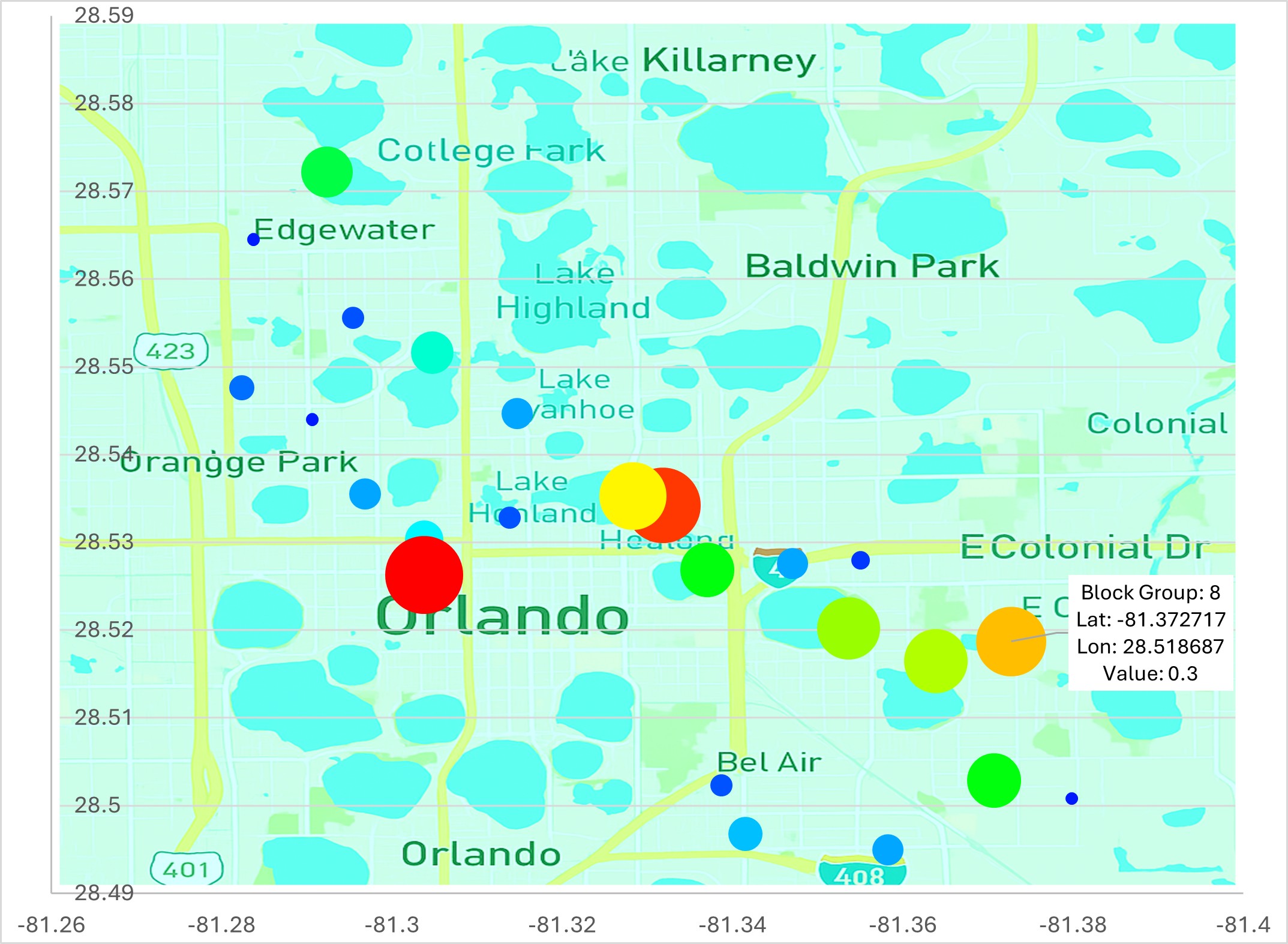
Forecast variables (e.g. EV ownership, EV peak kW contribution, hours with kW greater than X, etc.) vary widely across BGs. In addition to dashboard results (charts, tables, etc.) for individual selected BG and a table with all BG results, 20 key variable forecasts are provided as heat maps overlayed on street map backgrounds to provide visual information. The chart to the right displays EV kW contributions to peak August kW.increses

The color and circle size reflect the value of the variable (larger circle and red indicate larger value). Clicking on each circle provides additional information for the block group. Clicking on buttons beside the chart (not shown) select the bubble chart variable and open a street level map of the BG.

Detailed Customer Records

The Grid Impact Model provides detailed results for individual ZIP code areas Returning to the BEGIN tab worksheet and selecting "Extract Individual Customer 8,760 hourly Loads From the GIM Database" provides access to individual customer data including demographics, income, dwelling unit and 8,760 hourly loads.

This option is especially important for evaluating neighborhoods within ZIP codes. In this example a "high-end" neighborhood with household income above $100,000 and households with college degrees was selected.

This customer data extraction was used in the 3-minute online Demo Viewer Presentation

The Grid Impact Model provides detailed results for individual ZIP code areas As indicated above, there are a greater percentage of EV owners in ZIP 32806 compared to 32807. The percentage of EV owners in the high-end neighborhoods selected above is forecast to be 40%, that is, four out of every ten customers. To evaluate the impact on a local feeder branch and transformers, we exported several samples of ten households where four of the households have an EV.

Charts of one of the 10-customer samples shows (1) the huge spike in EV charging that occurs when the commuter returns home and plugs in the EV charger. The charger load is no more than 7 or 8 kW; however, when added on to the customer's normal charging pattern, an individual customer can contribute as much as 12 kW to the transformer and local feeder.

The Grid Impact Model provides detailed results for individual ZIP code areas The chart on the lower right shows that (2) while load diversity of the 10 customers limits the average impact of the EV owners, the extra load can still amount to as much as 2 kW, which, over time can be expected to shorten the life of the transformer or, create power quality problems or even contribute to the failure of the transformer.

GIM EV managed charging DSM programs include a (1) time-of-use (TOU) pricing option providing an incentive rate at an off-peak time and (2) managed charging that controls charging times. Both programs were applied to the 10-customer samples to evaluate the efficacy of each approach. As indicated in the chart, the TOU program results in a "charging peak" where 70 % of EV owners begin charging at the first hour of the rate incentive. The managed charging program is much more effective in shifting charging loads to off-peak hours.

Demand Side and VPP Options

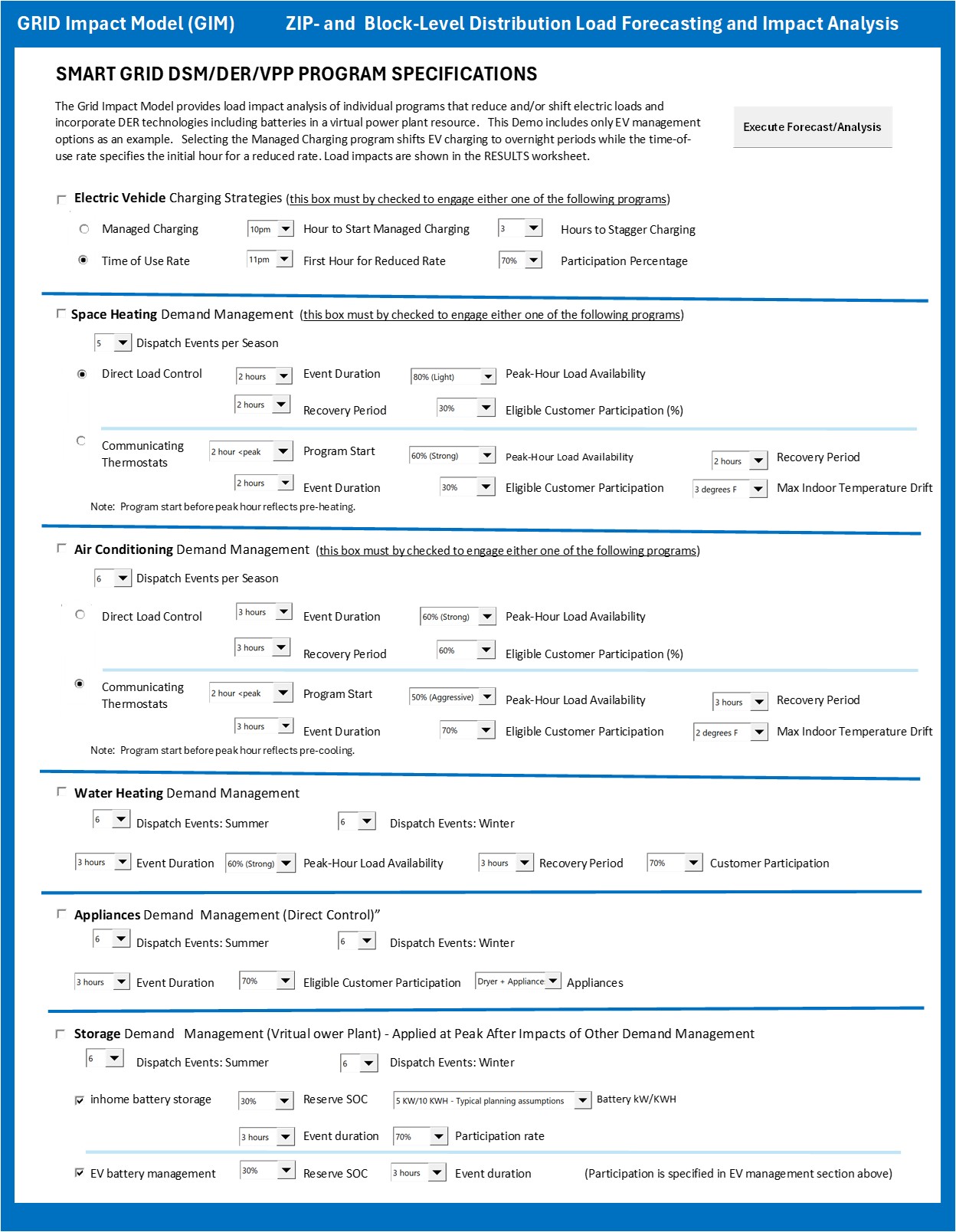
The Grid Impact Model provides detailed results for individual ZIP code areas Demand side management and virtual power plant scenarios include:
  • Electric Vehicle Charging (time-of-use rates and managed charging)
  • Space Heating (including preheating, DLC and thermostats)
  • Air Conditioining (including preheating), DLC and thermostats)
  • Water Heating (DLC and thermostats)
  • Appliances (dryer, other appliances)
  • Storage (VPP, home batteries and EV batteries)
Demand side management programs can be initiated individually or in any combination. Typical program design variables are specified in each end-use section.

Programs are dispatched relative to system peaks with options typical for each end use. For example, the air conditioning program can be dispacthed prior to the peak hour to conduct precooling while water heating is typically dispaced at the peak hour.

EV Ownership Forecasting Methodology Summary

The MAISY AI agent-based model is intuitively appealing; behavior of each household (i.e., each agent) in a representative sample of actual households is modeled providing a forecast of the entire population of households. Data on each household is available in the 7+ million household database collected by the US Census Department in its American Community Survey (ACS).

Information on income, demographics, dwelling unit, appliances, commuting characteristics, vehicle ownership, and other characteristics is available for each household record. MAISY EV Hourly Load Charging Databases Development Schematic

An AI process determines the probability of EV ownership for each household in the ACS database. The EV purchase probability is estimated with an AI KNN “nearest neighbor” algorithm that draws on a separate household/EV (HH/EV) database of more than 26,000 individual households where each household record includes income, demographics, other variables and most importantly EV ownership.

The KNN algorithm matches each ACS household with a group of similar households in the HH/EV database and calculates an EV ownership probability for the ACS household.

More detail on EV ownership and EV charging data development is available here.

Additional Model Application Detail

This section provides a summary description of options presented in the GIM model SETUP workbook tabs that define model analysis.

SETUP TABS

After selecting initial forecast check-box options and clicking on the "Execute Forecast/Analysis" button in the BEGIN tab, control is transferred sequentially to individual SETUP worksheet tabs to provide additional parameters for each selected forecast option.
  • Electric vehicles analysis parameters
    • Utility-wide forecast year EV saturation increase (% households with EVs).
  • Electrification in new and demolished/rebuilt construction
    • Allow the model to forecast percent saturation of all electric dwelling units for new construction and rebuilds, or
    • Specify Percent saturation of new all-electric customers.
  • Customer Growth
    • The GIM model provides two forecast horizons, 2030 and 2035. Historical five-year ZIP household growth rates for each ZIP code area are provided as default parameters. Users can change any of these growth rates to reflect alternative assumptions.
  • Weather Extremes
    • % increase in heating and cooling degree days in forecast year
  • Customer Segment Filtering
    • Select customer segments for analysis based on income, dwelling unit age, etc.
  • Demand Management: Various Program Parameters Including - see section above

Features That Make the SGRC Grid Impact Model (GIM) Utility Applications Unique

  • Actual anonymous utility customer data drawn from 7 million households MAISY database.
  • AI-assisted customer digital twins modeling process.
  • Easy-to-use Excel interface with dashboards, charts, tables and block-level heat maps.
  • Traditional residential load forecasts.
  • Hourly load EV, electrification, extreme weather, demand management impacts.
  • Service area, ZIP, block, and neighborhood detail.
  • Forecast and analysis results support utility business, investment and distribution system management.
  • Jackson Associates models and data development vetted by over 150 organizations.
Hourly-15min loads Click Here to see advantages of MAISY/SGRC data/analysis compared to Department of Energy, NREL and other engineering model-based sources.